Practical guide
An Accessible Tarot Study Sheet: Labels, Descriptions and Example
Give important elements visible text labels as well as color, state what the image is for, and provide a short identifying description with a visible fuller description when detail matters. Keep image observation, source notes and your association in separate fields.
Start with the task, not an automatic description of everything
A card study sheet can serve several purposes: identifying a card, comparing layouts, examining visual details or preserving an interpretation. The image description should help with the chosen task. A thumbnail used only to identify a named card needs different support from an exercise that asks the reader to compare three objects and their placement.
W3C’s Images Tutorial makes text alternatives depend on an image’s purpose and context. Informative images need alternatives that convey the relevant information; decorative images can have empty alternatives. Complex information can require a fuller text equivalent. [1] A study exercise that relies on details is a reason to describe those details, not to label every important card image decorative.
This guide provides an applied, original worksheet example. It is not an accessibility certification, a report of assistive-technology testing or a claim that any deck’s printed artwork is accessible to everyone. Ask users what they need, and record which checks you actually performed.
Use visible labels or shapes as well as color
If red means “my association” and blue means “source wording,” readers should also see those headings in words. A grayscale print, a reader who distinguishes colors differently or a display with altered colors should not have to infer the field’s job from hue.
W3C’s explanation of WCAG 2.2 Success Criterion 1.4.1 says color must not be the only visual way to convey information, indicate an action, prompt a response or distinguish a visual element. Additional visible cues can include text or shape. Text alternatives alone do not necessarily supply a visible cue for a sighted person who cannot distinguish the colors. [2]
Use a heading such as “Source note,” not only a colored box. Give an important diagram element a printed identifier such as A or a shape name. If you highlight an uncertainty, write “Unresolved question” beside it. Color can still help the design; its role should have a usable visible alternative.
A completed example with text and shape cues
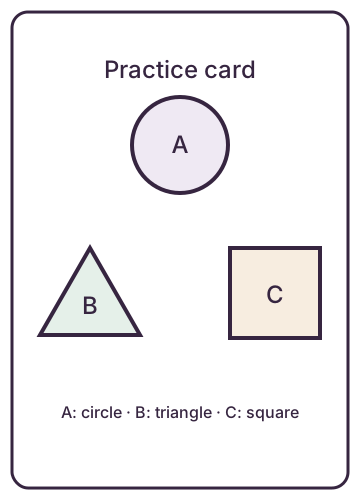
The following original practice diagram is not a historical tarot card. Its exercise is to describe the arrangement before making an association. A, B and C are printed on differently shaped objects; identifying them does not require knowing their colors.
| Field | Completed entry |
|---|---|
| Purpose | Describe the three labelled shapes and their placement, then propose a fictional scene. |
| Observation | Circle A is above triangle B and square C; B is left of C. |
| Source note | No historical meaning is assigned. The diagram and labels were created for this exercise. |
| My association | I imagine one meeting place above two different routes. That is an invented association. |
| Fictional task | What small decision could start a scene? |
| Tentative response | A traveller chooses between two routes after checking a notice at a meeting place. |
| Unknown or invented details | The image contains no traveller, notice or roads. I supplied those story details. |
The visible description is useful even when the image loads. A person studying the diagram can compare it with the observation; someone reading only the text receives the arrangement needed for the exercise. It does not claim that everyone will interpret the fictional scene in the same way.
Keep a short alternative and a readable full description together
For this diagram, the short alternative identifies the subject and points to the description immediately below. The visible description supplies the objects and arrangement. W3C’s complex-images tutorial describes this combination: a short identification plus a long description containing essential information. It demonstrates visible descriptions, captions and tables. [3]
Do not cram a multi-paragraph source discussion or a comparison table into one enormous alt attribute. Put structured material in the page with headings or an actual table. W3C notes that aria-describedby can flatten structured content into continuous text; it is not a substitute for making a table or long description readable in the document.
For a real card, first record the deck and edition. Describe what you can verify in that image. Keep an attributed guidebook passage in its own field, and keep your association separate again. An alternative such as “a card showing betrayal” silently turns an interpretation into an image fact. If the image only shows two figures, describe that relevant detail instead.
The deck checklist helps record edition-specific names and contents before borrowing a description from a different deck. [4] This article does not provide rights clearance for reproducing anyone else’s artwork.
A small HTML pattern with explicit headings
This example gives the worksheet a visible heading, identifies the diagram and keeps a long description in ordinary page content. Replace the sample diagram with an image you have permission to use; revise the description to fit the actual task and image.
<section aria-labelledby="study-title">
  <h2 id="study-title">Study the three labelled shapes</h2>
  <figure>
    <img src="study-diagram.svg"
         alt="Three-shape diagram labelled A, B and C; description follows.">
    <figcaption>
      A is a circle near the top centre. B is a triangle at the
      lower left. C is a square at the lower right. There are
      no arrows or connecting lines.
    </figcaption>
  </figure>
  <h3>My observation</h3>
  <p>Circle A is above triangle B and square C.</p>
  <h3>My chosen association</h3>
  <p>I imagine a meeting place and two routes.</p>
</section>
If you add editable fields, give each control a visible, programmatically associated label. [5] Explain whether the page saves, downloads or submits the entry according to its actual implementation. A printable sheet or plain-text download can be sufficient; adding a form is not required for this exercise.
Check the finished sheet, and record what remains untested
- Color: view a grayscale print or preview. Can you identify every field and diagram element from labels or other visible cues?
- Image: hide or block it for this check. Does the adjacent text still support the stated exercise? Are source facts and personal associations distinguishable?
- Narrow screen: inspect the page at a phone-sized width. Keep the description in normal reading order. Put a wide comparison table in a labelled scroll region if it cannot fit; do not make the whole page scroll sideways.
- Text size: enlarge the text. Check that headings, descriptions and inputs remain visible without overlapping.
- Keyboard: if controls or links are present, move through them and check visible focus and usable labels.
These are proposed manual checks, not checks claimed to have been completed for your sheet. They cover only some access needs. If publishing a reusable template, record the browser, dimensions and actual results, then seek appropriate accessibility review before making a conformance claim.
Download the editable plain-text study sheet. It contains separate observation, source and association fields plus a place to record checks performed and checks still pending. Use the format that supports your task; you can finish with a short description and no interpretation.
Sources and further reading
- W3C WAI: Images TutorialRead the complete tutorial overview. Supports purpose- and context-specific text alternatives; does not certify this draft.
- W3C: Understanding Success Criterion 1.4.1, Use of ColorRead the complete explanation. Supports additional visible cues when color conveys information; no complete WCAG conformance claim is made.
- W3C WAI: Complex ImagesRead the complete tutorial. Supports short identification with a structured full description and explains the limits of aria-describedby for structured information.
- Tarot Tools: A 78-Card Tarot Deck ChecklistRead the complete current guide. Cited for recording the edition and actual inventory, not as a source of licensing or accessibility clearance.
- W3C WAI: Labeling ControlsRead the complete current tutorial. Supports explicit or implicit label association for editable controls; no actual new form or conformance claim is made here.